> For the complete documentation index, see [llms.txt](https://docs.atloss.de/llms.txt). Markdown versions of documentation pages are available by appending `.md` to page URLs; this page is available as [Markdown](https://docs.atloss.de/en/academy/technical-terms/sidebar.md).
# Sidebar
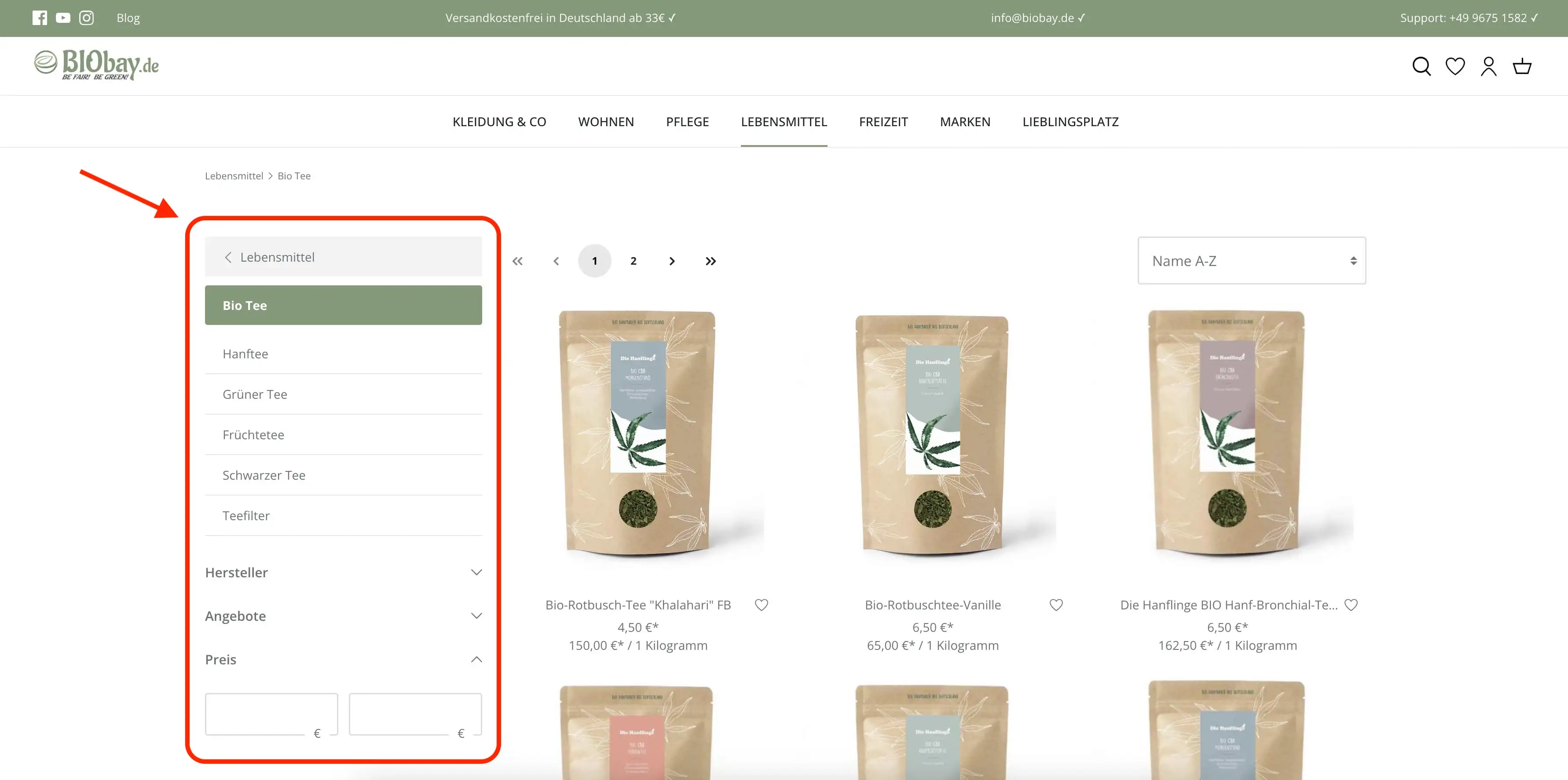
Eine Sidebar in einem Online-Shop ist ein vertikales Bereichselement, das sich in der Regel an der linken Seite des Hauptinhalts oder der Produktliste befindet. Die Sidebar enthält im Shopware Kontext zusätzliche Links, Filteroptionen, Widgets oder Navigationsmenüs, um die Benutzererfahrung und die Interaktion im Shop zu verbessern.
Dies sind die häufigsten Elemente und Funktionen, die in einer Sidebar zu finden sind:
1. Kategorien und Filter: Die Sidebar kann Kategorien oder Produktfilter anzeigen, die es dem Benutzer ermöglichen, die Produktliste nach bestimmten Kriterien wie Kategorie, Preis, Marke, Größe, Farbe und mehr zu filtern. Dies erleichtert es den Benutzern, gezielt nach bestimmten Produkten zu suchen.
2. Angebote und Werbeaktionen: Die Sidebar kann verwendet werden, um Sonderangebote, Rabatte oder Werbeaktionen hervorzuheben. Dies kann dazu beitragen, die Aufmerksamkeit der Benutzer auf laufende Aktionen zu lenken.
{% hint style="info" %}
Die Sidebar dient dazu, die Website-Navigation und -Interaktion zu erleichtern, indem sie relevante Informationen und Funktionen auf jeder Seite anzeigt. Eine gut gestaltete Sidebar trägt zur Benutzerfreundlichkeit bei und kann die [Conversion-Raten](/en/academy/technical-terms/conversion.md) erhöhen, indem sie den Benutzern ermöglicht, schnell auf relevante Inhalte und Optionen zuzugreifen.
{% endhint %}
---
# Agent Instructions
This documentation is published with GitBook. GitBook is the documentation platform designed so that both humans and AI agents can read, navigate, and reason over technical content effectively. Learn more at gitbook.com.
## Querying This Documentation
If you need additional information that is not directly available in this page, you can query the documentation dynamically by asking a question.
Perform an HTTP GET request on the current page URL with the `ask` query parameter, and the optional `goal` query parameter:
```
GET https://docs.atloss.de/en/academy/technical-terms/sidebar.md?ask=&goal=
```
`ask` is the immediate question: it should be specific, self-contained, and written in natural language.
`goal` is optional and describes the broader end goal you are ultimately trying to accomplish on behalf of the user. GitBook uses it to tailor the answer towards what is most useful for that goal.
The response will contain a direct answer to the question and relevant excerpts and sources from the documentation.
Use this mechanism when the answer is not explicitly present in the current page, you need clarification or additional context, or you want to retrieve related documentation sections.