> For the complete documentation index, see [llms.txt](https://docs.atloss.de/llms.txt). Markdown versions of documentation pages are available by appending `.md` to page URLs; this page is available as [Markdown](https://docs.atloss.de/en/included-extensions/features.md).
# Features
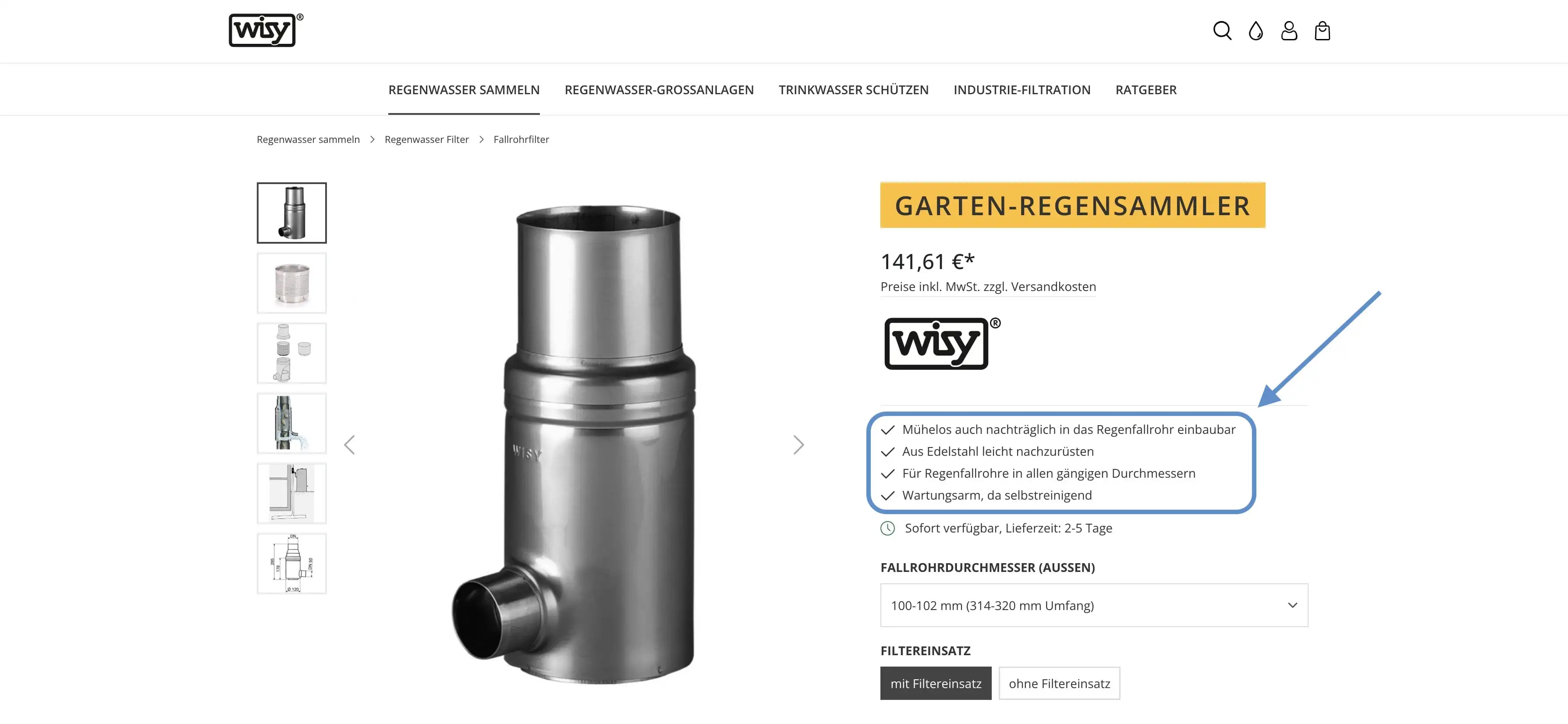
Häufig macht es Sinn besondere Vorteile bei Produkten hervorzuheben, um dem Kunden die Kaufentscheidung leichter zu gestalten. Die Features Erweiterung des Themes ist hierfür ein nützliches Werkzeug, um konkrete Einzelheiten markant auf der [Produkt Detailseite](/en/academy/technical-terms/product-detail-page.md) zu präsentieren.
Features kannst du in deiner Shopware Administration unter "\[Produkt] > Spezifikationen > Zusatzfelder > Produkt > Features" hinterlegen. Beachte hierbei, dass die einzelnen Features mit einem Semikolon semantisch getrennt werden müssen, damit eine entsprechende Listenansicht generiert werden kann. Eine korrekte Schreibweise sieht dabei wie folgt aus:
Erstes Feature;Zweites Feature;Drittes Feature
{% hint style="info" %}
Erwähnenswert ist hierbei, dass das letzte Feature nicht mit einem Semikolon abschließt. Ansonsten entsteht ein weiterer Listenpunkt ohne Inhalt.
{% endhint %}
Standardmäßig wird vor jedem Listenpunkt ein Haken [Icon](/en/academy/technical-terms/icon.md) angezeigt. Dies kannst du in der [Theme Konfiguration](/en/theme-configuration/product-detail-page/buy-box.md#features) unter "Buy Box" im Abschnitt "Features" neben weiteren Einstellungsmöglichkeiten auf deine Bedürfnisse anpassen und austauschen.
---
# Agent Instructions
This documentation is published with GitBook. GitBook is the documentation platform designed so that both humans and AI agents can read, navigate, and reason over technical content effectively. Learn more at gitbook.com.
## Querying This Documentation
If you need additional information that is not directly available in this page, you can query the documentation dynamically by asking a question.
Perform an HTTP GET request on the current page URL with the `ask` query parameter, and the optional `goal` query parameter:
```
GET https://docs.atloss.de/en/included-extensions/features.md?ask=&goal=
```
`ask` is the immediate question: it should be specific, self-contained, and written in natural language.
`goal` is optional and describes the broader end goal you are ultimately trying to accomplish on behalf of the user. GitBook uses it to tailor the answer towards what is most useful for that goal.
The response will contain a direct answer to the question and relevant excerpts and sources from the documentation.
Use this mechanism when the answer is not explicitly present in the current page, you need clarification or additional context, or you want to retrieve related documentation sections.