> For the complete documentation index, see [llms.txt](https://docs.atloss.de/llms.txt). Markdown versions of documentation pages are available by appending `.md` to page URLs; this page is available as [Markdown](https://docs.atloss.de/en/theme-configuration/general/typography.md).
# Typography
### Overview
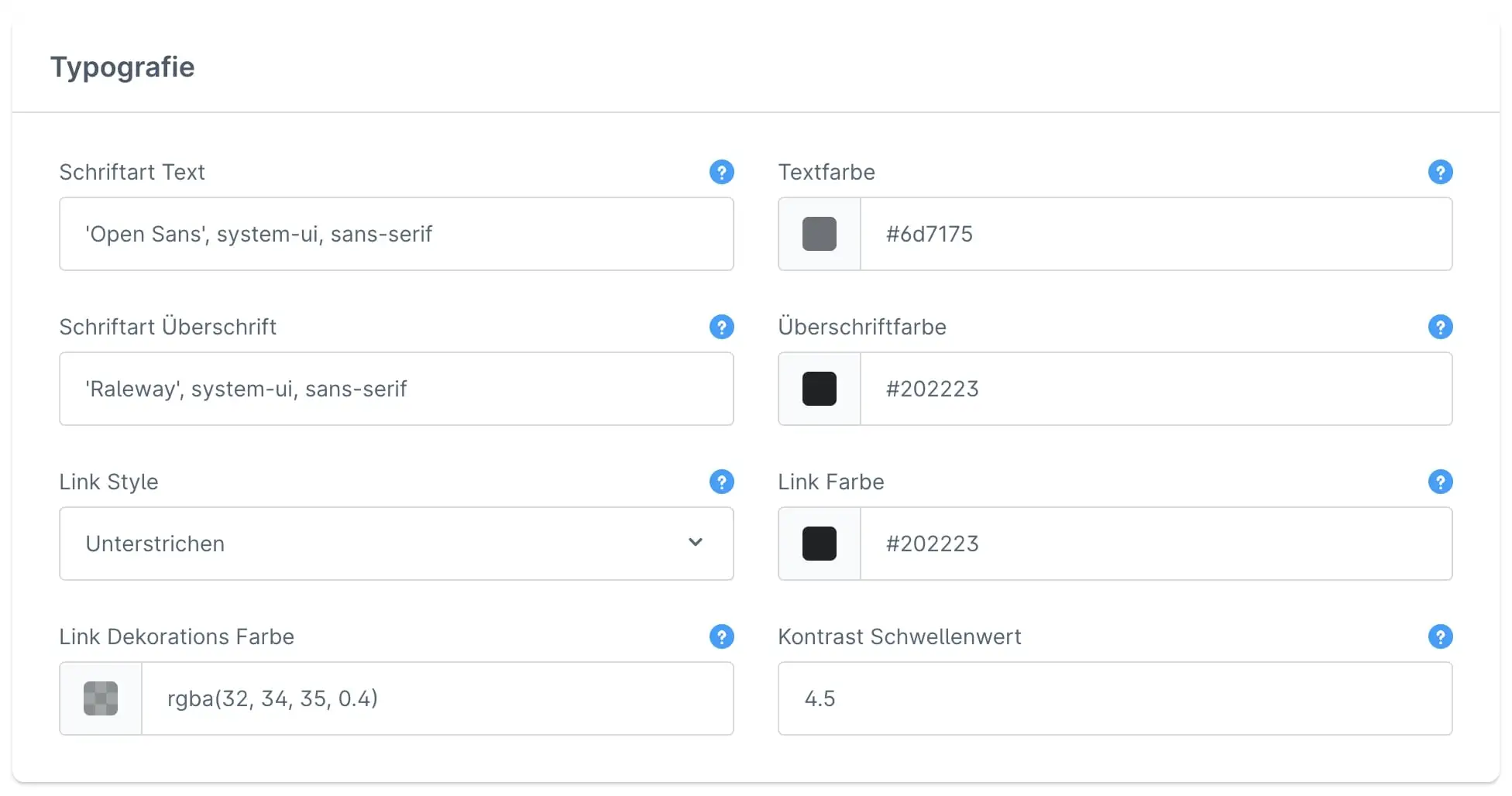
In this section, you will find everything related to the typeface of your online shop. Here, you can customize continuous text, headings, and links according to your preferences.
### Configuration
Font Text
Here you can select the font for your body text. The font name must be enclosed in single quotation marks. The default font is ‘Open Sans’.
It is always recommended to end with `system-ui, sans-serif` or `system-ui, serif` separated by commas. This is the browser's fallback font if the actual font could not be loaded. Depending on whether you use a serif or sans-serif font, select the appropriate value.
***
Please note that the font you want to use must also be located on your server. It can be uploaded either manually or using an app from the Shopware Store. For data protection reasons, we do not recommend direct integration via a Google link. The default fonts available are: ‘Open Sans’, ‘Raleway’ and ‘Inter’.
Font Color
This is the font color used for your body text in the shop.
***
[Variable:](/en/academy/technical-terms/variable.md) `$sw-text-color`
Font Heading
Here you can specify the font for your headings. The font name must be enclosed in single quotation marks. The default font is ‘Raleway’.
It is always recommended to end with a comma-separated list of `system-ui, sans-serif`, or `system-ui, serif`. This is the browser's fallback font if the actual font cannot be loaded. Depending on whether you are using a serif or sans-serif font, select the appropriate value.
***
Please note that the font you want to use must also be located on your server. It can be uploaded either manually or using an app from the Shopware Store. For data protection reasons, we do not recommend direct integration via a Google link. The default fonts available are: ‘Open Sans’, ‘Raleway’ and ‘Inter’.
Heading color
This is the font color used for your headings in the shop.
***
[Variable:](/en/academy/technical-terms/variable.md) `$sw-headline-color`
Link Style
Das Theme bietet dir die Möglichkeit deine Links in unterschiedlichen Designs darzustellen. Diese wirken sich ins besondere auf den [Hover-Effekt](/en/academy/technical-terms/hover-effekt.md) aus. Diesen kannst du dir bspw. auf der [Produkt Detailseite](/en/academy/technical-terms/product-detail-page.md) am Hinweis "Preise inkl. MwSt. zzgl. Versandkosten" ansehen.
The theme offers you the option of displaying your links in different designs. These have a particular effect on the [hover effect](/en/academy/technical-terms/hover-effekt.md). You can see this, for example, on the [product detail page](/en/academy/technical-terms/product-detail-page.md) in the note “Prices include VAT plus shipping costs.”
***
Underline:
Underline with animation:
Link Color
This is the font color used for your links in the shop.
***
[Variable:](/en/academy/technical-terms/variable.md) `$atl-link-color`
Link Decoration Color
The link decoration color represents the color of the underlining of your links.
Contrast threshold
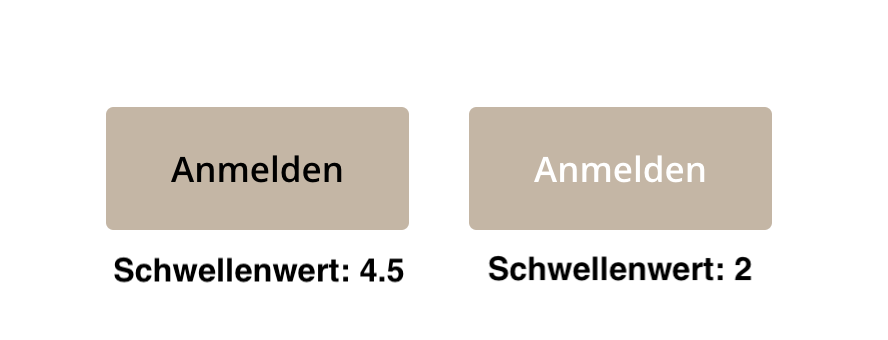
The contrast ratio determines when the brightness of the color changes from “dark” to “light.”
Acceptable values for Web Content Accessibility Guidelines (WCAG) 2.0 are 3, 4.5, and 7. This value calculates when a foreground color is displayed as “dark” or “light” on a background. For example, this is how the text color on a primary button is calculated.
---
# Agent Instructions
This documentation is published with GitBook. GitBook is the documentation platform designed so that both humans and AI agents can read, navigate, and reason over technical content effectively. Learn more at gitbook.com.
## Querying This Documentation
If you need additional information that is not directly available in this page, you can query the documentation dynamically by asking a question.
Perform an HTTP GET request on the current page URL with the `ask` query parameter, and the optional `goal` query parameter:
```
GET https://docs.atloss.de/en/theme-configuration/general/typography.md?ask=&goal=
```
`ask` is the immediate question: it should be specific, self-contained, and written in natural language.
`goal` is optional and describes the broader end goal you are ultimately trying to accomplish on behalf of the user. GitBook uses it to tailor the answer towards what is most useful for that goal.
The response will contain a direct answer to the question and relevant excerpts and sources from the documentation.
Use this mechanism when the answer is not explicitly present in the current page, you need clarification or additional context, or you want to retrieve related documentation sections.
 Underline with animation: